Notifications that email is losing
Time sensitive events where an unread inbox is a failed workflow, so someone asks for the text message version.
Programmable messaging
Messaging arrives on a roadmap as a small ticket and turns into a quarter. Sending is trivial. Receiving, reconciling, registering senders, and keeping consent state honest is the part that eats the sprint. Tells is one REST surface for the send path and the listen path, with the telecom operation owned by the people who do it for a living.
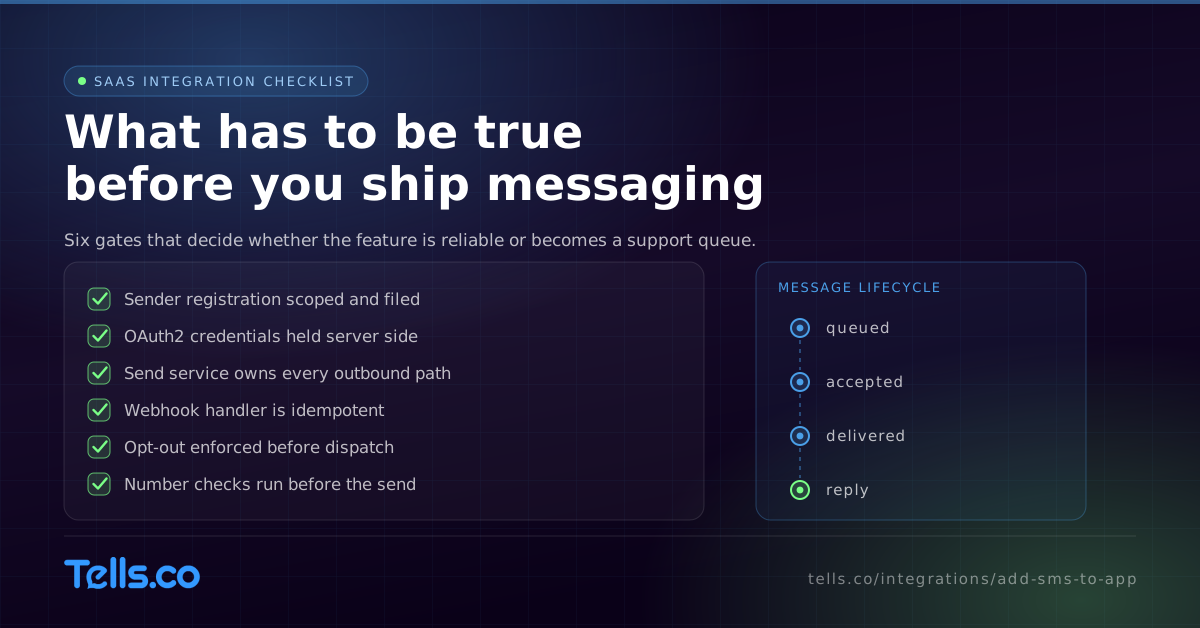
Adding SMS to an application means two integrations, not one: an outbound call that sends the message and an inbound endpoint that receives what the network reports back. Tells exposes both through a single OAuth2 authenticated REST API that also covers MMS, RCS with automatic SMS fallback, AI voice agents, call announcements, and number intelligence on United States and Canada routes. Sender registration and program monitoring are performed by the Tells team, which keeps the scope your engineers own inside your own codebase.
Why now
The ticket is rarely written as messaging infrastructure. It shows up looking like a feature.
Time sensitive events where an unread inbox is a failed workflow, so someone asks for the text message version.
Your users want to reply to a customer inside your product instead of switching to a personal phone.
An enterprise account makes messaging a renewal condition, and the integration is suddenly dated.
Onboarding, scheduling, or approval steps that complete far more often when the reminder actually gets read.
Build order
Access is provisioned per account, so step zero is a scoping call rather than a signup. Everything after that is ordinary product work.
Decide who the sender legally is, what the traffic is for, and which sender type fits. This determines registration, and registration determines when you can send at volume. The Tells team files and tracks it.
OAuth2 credentials are issued during onboarding and scoped to your workspace. Keep them server side. Onboarding includes environment setup and a guided first send, which is usually the quickest way to validate your plumbing.
Decide what a message is in your schema, what a conversation is, and where consent lives. Teams that skip this end up storing message state in three places and reconciling it forever.
One internal service owns outbound. Everything in your product that wants to send calls that service, not the API directly. Put number checks and suppression enforcement in front of the dispatch, where they can still stop a bad send.
Expose one webhook endpoint, verify what it receives, make the handler idempotent, and write events to durable storage before you act on them. This is where most messaging integrations either become reliable or become a support queue.
Once the two paths are live, RCS with SMS fallback, AI voice agents, and call announcements are scope conversations on the same account rather than new vendor evaluations.
Webhook events
Message lifecycle events are the part of a messaging integration that quietly decides whether your feature is trustworthy. Build the handler for the messy cases first.
Automated STOP and HELP handling runs on the platform side, but your application still needs to honor the resulting suppression state everywhere it can trigger a send.
Identity and number checks
Application databases collect phone numbers from forms, imports, and integrations, which means they collect bad ones. Number intelligence gives your product something to check against.
Validate carrier and line type when a user first enters a number, so the failure surfaces in your form rather than in a support ticket weeks later.
The caller name on record for a number, which helps when your product needs to show a user who they are about to contact.
A 0 to 100 activity score you can threshold on before including a number in a send, so dormant records stop consuming budget and delivery statistics.
These run in real time and are usable directly in the send path, which means routing and suppression can be decided per message rather than in a nightly batch.
Detail: Number intelligence.
Channel progression
The strongest argument for choosing carefully once is that the next channel should not be another procurement cycle.
US and Canada routes with 10DLC, short code, and toll-free sender support, automated STOP and HELP handling, and per-message carrier delivery receipts.
Detail: /solutions/high-volume-smsVerified brand sender with rich cards, carousels, and quick replies, and automatic SMS fallback on devices that cannot receive RCS, so you do not maintain two send paths.
Detail: /solutions/rcs-messagingAI SMS and voice agents that share conversation context and escalate to a human with the full transcript, plus branded SMS call announcements ahead of an outbound dial.
Detail: /solutions/ai-sms-voice-agentsMulti tenant
Multi tenant sending is a different problem from a single brand sending for itself, and it is worth naming before you design the schema.
Carrier and registry approval decisions remain outside any provider control, including ours.
Use cases
Order, appointment, status, and approval messages triggered by events already in your system.
Inbound replies routed to the right conversation and surfaced in your own interface.
Messaging steps inside the automation builder your customers already use.
Operational messages to staff without standing up a separate alerting vendor.
Messaging your customers experience as a feature of your product rather than a third party integration.
A REST call in front of an older system that has no messaging path of its own.
FAQ
Build one internal send service that calls the messaging API, and one webhook endpoint that receives carrier acceptance, delivery, inbound messages, replies, and opt-out events. Everything else in your product routes through those two paths. With Tells both live on a single OAuth2 authenticated REST surface.
A programmable SMS API lets your application send and receive messages over HTTP instead of through a console, and reports what happened as callbacks. The Tells surface additionally covers MMS, RCS, AI voice agents, call announcements, and number intelligence, so one integration covers more than text.
The code is usually the short part. Sender registration is the pacing item, because carriers and The Campaign Registry review filings on their own schedule. Tells prepares, submits, and tracks that work, but plan your launch around a review cycle rather than a build estimate.
No. Access is provisioned per account, and the full reference, SDKs, Postman collection, and sandbox environment come with account credentials during onboarding. The public developer documentation page describes what the platform supports so you can evaluate fit first.
Automated STOP and HELP handling runs on the platform side and an opt-out event is delivered to your webhook. Your application still needs to record the suppression state and enforce it in every code path that can trigger a send.
Coverage is United States and Canada carrier routes. If your product needs to reach recipients beyond North America, raise it during scoping so the answer arrives before you commit engineering time to an integration.
A short conversation about your sender model, volumes, and which events should trigger a message. That is what determines registration, and registration is what sets your launch date.